AI Invoice Processing for Construction: When One AI Isn't Enough (Part 1 of 4)
How combining OCR + AI creates a system that actually works for construction AP.
Every construction company has a stack of vendor invoices waiting to be processed. Scanned PDFs from lumber yards, equipment rentals, concrete suppliers—each one needs the same tedious treatment: read the vendor info, squint at the handwritten job coding in the corner, key it all into the accounting system, rename the file, move it to the archive folder. Repeat fifty times a week.
It's the kind of repetitive work that screams for automation. And with AI tools getting better every month, you'd think pointing ChatGPT or Claude at a pile of invoices would solve the problem.
It doesn't. At least, not with a single AI tool working alone.
This four-part series covers how AI can actually automate invoice processing for construction companies—from reading handwritten annotations to generating import files for your accounting software. It's based on a real production system built for Sage 300 CRE, but the approach adapts to whatever accounting software you're running.
The series:
- Part 1 (this article): Why one AI isn't enough—the hybrid approach
- Part 2: Making AI learn your vendors' patterns
- Part 3: Connecting AI to your accounting software
- Part 4: Building a usable tool your team will actually use
The Handwriting Problem
Construction invoices aren't like retail receipts. When an invoice arrives from your lumber supplier, someone on your team grabs a pen and scrawls the job number, cost code, and expense category right on the document. Maybe "24-105" for the job, "06-100" for the cost code (Division 06, rough carpentry), and "M" for materials.
That handwritten coding is the whole point. It's how the cost gets allocated to the right job. And it's exactly where AI tools stumble.
Modern AI models like Claude and GPT-4 can "see" images and PDFs. They're solid at reading printed text, understanding context, and extracting structured data. But handwriting? Especially the kind of rushed scrawl that happens when a project manager is coding invoices between site visits?
That's where things fall apart.
When you ask Claude to extract a handwritten job number from a scanned invoice, you'll get results—but the confidence is all over the place. Sometimes it nails it. Sometimes it reads "24-105" as "24-185" or "21-105." When you're processing dozens of invoices, those errors add up fast. One wrong job number means costs allocated to the wrong project, which means your job cost reports are garbage.
Why Vision AI Struggles with Handwriting
AI vision models are trained primarily on printed text, photos, and digital documents. They understand handwriting in a general sense, but they weren't optimized for it. More importantly, they're doing two jobs at once: recognizing the characters AND interpreting what they mean.
That dual task creates problems. The model might "see" something ambiguous—is that a 3 or an 8?—and make a guess based on context. But the context it's using comes from general training data, not your specific invoice formats or coding conventions.
The result: confident-sounding extractions that are subtly wrong.
The Hybrid Solution
The fix isn't finding a better AI model. It's splitting the problem in two.
Step 1: Dedicated OCR for text extraction
Optical Character Recognition (OCR) services like Azure Document Intelligence or Google Document AI are purpose-built for reading documents. They've been trained specifically on handwriting recognition, including messy real-world samples. They don't try to interpret what the text means—they just convert pixels to characters with high accuracy.
Azure's "prebuilt-read" model, for example, handles mixed printed and handwritten text on the same page. It outputs everything as structured text, preserving the spatial layout so you can tell what's in the header versus what's scrawled in the margin.
Step 2: AI for interpretation
Once you have clean text extraction, a model like Claude can focus on what it's actually good at: understanding context, applying business logic, and structuring the output.
Feed Claude the OCR results and ask it to identify the vendor name, invoice number, job coding, and cost allocation. It's no longer guessing at character shapes—it's working with text and applying reasoning. That's a much better fit for how these models are designed.
What the Hybrid Approach Looks Like
Here's the workflow in practice:
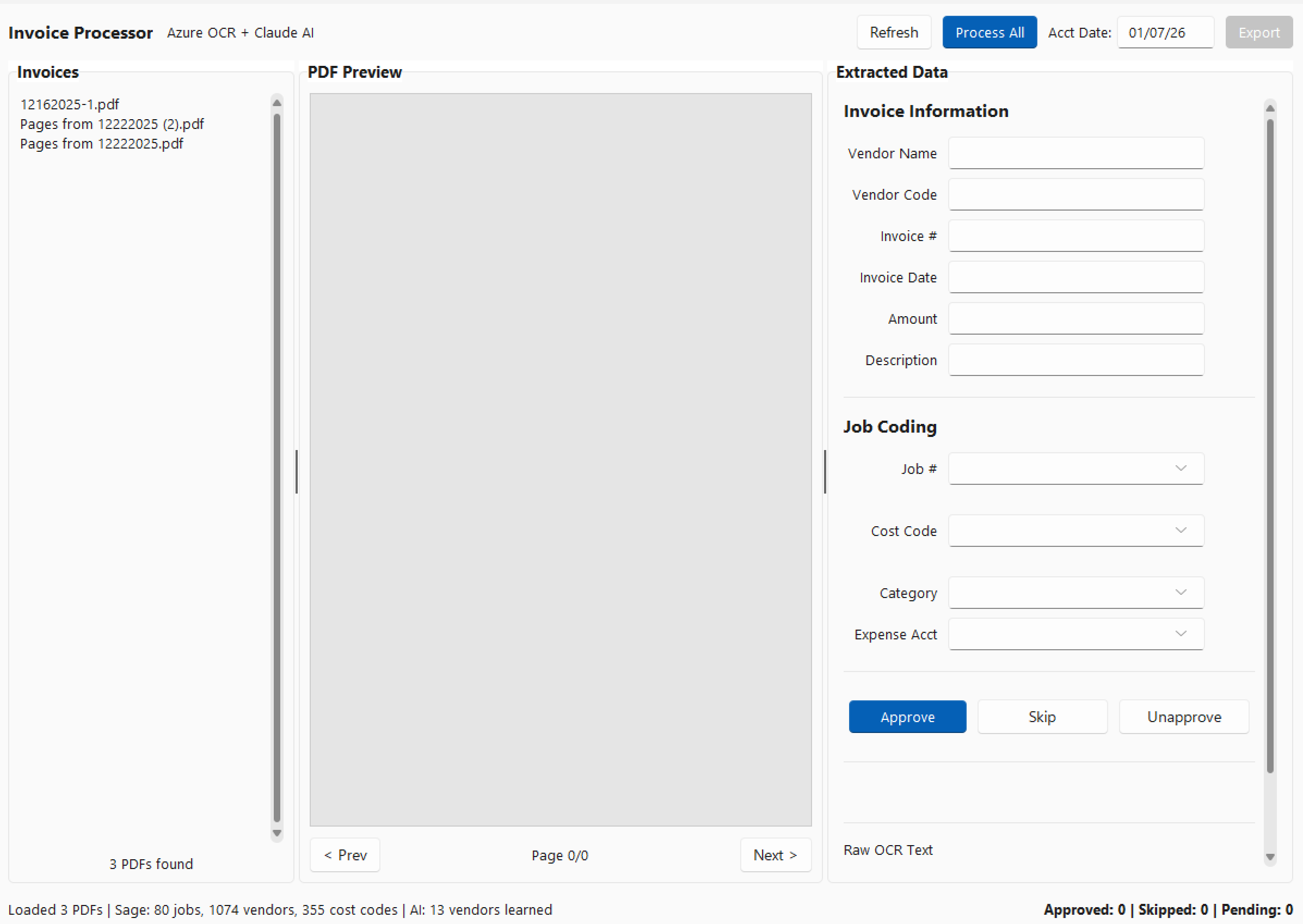
- Invoice PDF goes to Azure Document Intelligence → Returns markdown-formatted text with all printed and handwritten content
- Markdown text goes to Claude → Returns structured data: vendor name, invoice number, date, amount, job number, cost code, category, expense account
- Each field includes a confidence score → High, medium, or low based on how clearly the information was present
- Human reviews flagged items → Yellow and red confidence scores get a second look before approval
The key insight: Azure handles the hard part (reading the handwriting), and Claude handles the smart part (understanding what it means). Neither tool is doing something it's bad at.
Cost Reality Check
Azure Document Intelligence runs about $1.50 per 1,000 pages on the standard tier. For a construction company processing a few hundred invoices a month, that's pocket change—maybe $5-10/month for the OCR piece.
Claude API costs depend on the prompt size and model choice, but figure roughly $0.01-0.03 per invoice using Claude Sonnet. Add it up and you're looking at well under $50/month for AI costs on a typical invoice volume.
Compare that to the labor cost of manual entry and the error cost of misallocated job expenses, and the ROI math gets obvious fast.
What's Next
The hybrid approach solves the extraction problem, but there's more to building a practical system. In Part 2, we'll cover how to make the AI learn your patterns—so it starts suggesting job codes based on vendor history instead of treating every invoice like the first one it's ever seen.
This series is based on a production invoice processing system built for Sage 300 CRE, but the approach works for any construction accounting software with a little adjustment. Whether you're running Viewpoint, Procore, Foundation, or QuickBooks, the hybrid AI workflow translates.